
TL;DR
Multi-site backup lets any location back up or copy data to any other location, replacing the fixed hub-and-spoke model where every site depends on one central repository.
- Removes the single point of failure created by a designated hub site
- Lets backup direction be set by policy, not fixed architecture
- Protects physical servers, VMs, cloud instances, and SaaS from one console
- Suits distributed enterprises, MSPs, and ROBO environments with location-based compliance need
Most backup setups revolve around a single center of gravity. There’s one primary site, one cloud target, and one direction data flows in. That works fine right up until you have more than one location that matters. For distributed enterprises, MSPs juggling multiple client environments, and organizations with remote or branch offices, a single hub model quickly turns into a single point of failure and a real management headache.
BDRShield’s Multi Site Backup was built for that reality. Any workload, at any site, can be backed up or copied to any other site, all from one console.
What is multi site backup?
Multi site backup is the ability to protect workloads across multiple physical or cloud locations and have copies of those backup data between sites, rather than routing everything through one central repository. It gives organizations resilience against outages at any single site, along with flexible, policy driven control over where their data actually lives.
Why traditional, single site backup falls short
Conventional backup tools are usually built around a hub and spoke pattern. Every site sends its backups to one central repository, whether that’s a data center or a cloud target. It’s simple to set up, but it creates real problems once you’re operating across more than one location.
If the hub site goes down or its repository is compromised, every other site’s backup copy is put at risk right along with it. Data placement tends to be rigid too, since workloads at Site B can typically only be backed up to that one designated hub, with no option to send a copy to Site C or to a regional location closer to your compliance needs. Visibility often gets fragmented, because managing backup jobs, policies, and alerts separately for each site, or stitching together several different tools, makes it hard to get a clear, real time picture of protection across the business. And recovery ends up just as constrained, limited to whatever that single hub repository happens to hold.
For organizations with multiple offices, remote branches, or spread out infrastructure, these aren’t rare edge cases. They’re everyday conditions.
How BDRShield’s distributed architecture solves it
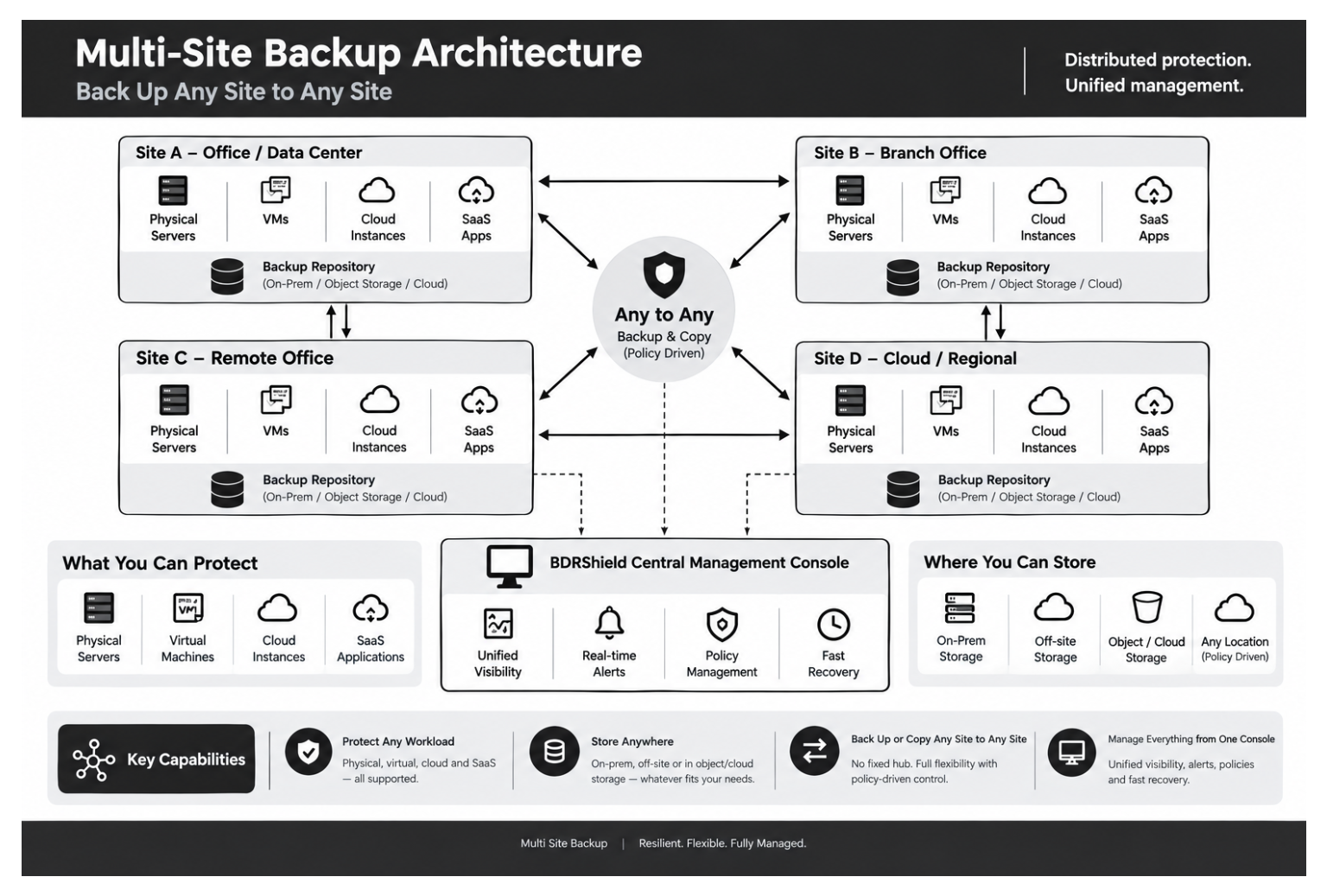
BDRShield takes a different approach with a distributed multi site backup architecture, where every site can act as both a protected workload location and a backup destination for other sites. It comes down to four capabilities working together.
Protect any workload. Physical servers, virtual machines, cloud instances, and SaaS applications are all supported as protected workload types, so mixed environments don’t need a separate tool for every workload type.
Store anywhere. Backup data can land on prem, off site, or in object/cloud storage, whatever fits a given site’s infrastructure and compliance needs.
Back up or copy any site to any site. This is really the heart of the architecture. Instead of a fixed hub, each site (Site A, Site B, Site C, and beyond) keeps its own backup repository, and that repository can hold copy of the backup data from any other site. A backup job might move data from Site A to Site B, a copy job could then move it from Site B to Site C, and another job might bring it all the way back around to Site A. Any to any means the direction of protection isn’t locked in by the architecture. It’s simply a policy decision.
Manage everything from one console. No matter how many sites are involved, BDRShield’s central management console gives you unified visibility into every site, backup, and health status in real time, along with smart alerts for proactive monitoring, policy management that lets you set a rule once and apply it everywhere, and fast recovery options across the whole distributed footprint.
Why any to any actually matters
The practical upside of an any to any model is resilience without rigidity. A three site organization isn’t stuck with one designated “backup site.” Site A can back up to Site B, Site B can back up to Site C, and Site C can send a copy back to Site A, creating a resilient loop instead of a fragile dependency chain. When priorities shift, whether a new site opens, a regional compliance requirement changes, or a site simply needs an extra offsite copy, the backup topology can adapt through policy rather than a full re architecture project.
Centralized management, distributed protection
The other half of the equation is control. Spreading data across multiple sites doesn’t have to mean spreading out the effort of managing it. BDRShield’s centralized backup management pulls every site’s protection status, policies, and alerts into one place, so IT and MSP teams aren’t logging into a separate tool per location just to answer a simple question: are we protected right now?
Who this is for
Multi Site Backup is a strong fit for multi branch and multi office enterprises that need consistent protection across locations without leaning on a fragile central chokepoint. It also suits MSPs managing backup across several client environments from a single pane of glass, ROBO (remote and branch office) environments where local infrastructure varies but protection standards shouldn’t, and organizations with regional or compliance driven needs around exactly where their backup copies land.
FAQ
How does multi site backup work?
Each site runs its own workloads and keeps its own backup repository. Backup and copy jobs move data between repositories, any site to any site, based on policies configured centrally, instead of everything flowing through one fixed hub.
What’s the difference between multi site backup and traditional offsite backup?
Traditional offsite backup usually sends data in one direction, from a primary site to a single secondary location. Multi site backup supports data movement between any number of sites in any direction, so protection doesn’t hinge on one designated backup destination.
Is multi site backup only for large enterprises?
Not at all. It’s especially useful for smaller distributed organizations and MSPs, where a rigid hub and spoke setup is often harder to justify or maintain than a flexible, policy driven one.
Can I manage multi site backup from one place?
Yes. BDRShield’s central management console gives you unified visibility, alerting, and policy management across every site, no matter how many locations are involved.
Protect every site, manage from one place
Multi Site Backup comes down to a simple idea: protection shouldn’t be limited by geography, and management shouldn’t be fragmented by it either. With any to any backup and copy flexibility, plus one console to run it all, BDRShield gives distributed organizations a backup architecture that actually matches how they operate.
Follow our Twitter and Facebook feeds for new releases, updates, insightful posts and more.

