
Let’s find out what Zukmo has to offer with this release update. The team has been working really hard to bring the desired result to grapple the needs of the users. This time the focus is not only on the back end improvements, the front end has also been improved to delight you all.
So what’s fresh for this update? After carefully examining the queries from our valuable customers, we have added galore of new features with an easy-to-use user interface that makes it the real user friendly.
FILE SYNCHRONIZATION
It’s time to download and install the latest Zukmo Sync Utility and start experiencing many new features.
- Share and Collaboration
Zukmo not only allows you to share files, now you can collaborate on contents quickly and easily. Get yourself connected with people easily and invite them to view, discuss and/or edit content.
HOW TO: Right click on synced folders in Zukmo and start collaborating. How simple can it get?


- File Version Restore
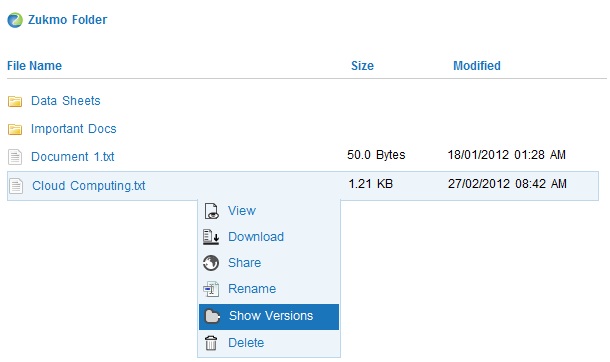
One other important feature to consider is the file version restore. Zukmo not only shows the different versions of the files, but it also helps you to restore any desired versions.
HOW TO: Right click on files and ‘Show Versions’. Restore any required version which will be available across devices.

- File Preview
Now you don’t have to download files and view them. The task is made even simpler by previewing the files using Zoho Viewer directly with Zukmo.
HOW TO: Click on files to preview it using Zoho Viewer.

EMAIL RESTORATION
Guess what??? Now you can also restore your gmail/gmail apps email. You don’t have to worry if you have deleted any of your important emails, because Zukmo restores it all for you at ease.
HOW TO: Go to ‘My Services’ and add the required services.

Finally, the mobile website has also got the touch. It showcases an overall improvement leading to better usability of Zukmo from anywhere.
You don’t have to wait longer for future releases that will pair with all your needs.

