
We are pleased to announce that a fresh release of Zukmo alpha is now available for your consideration and use. The feature enhancements are hashed out in detail following specific notes meant for our new users and existing users.
New Users:
We invite all new users to simply create a FREE account with us and install the new browser plugin appropriate for their browser type. If you click on the Getting Started link, you will be able to access a quick and easy primer meant for all new users who want a 5 minute run down on the basics. This will get you answers to “What is Zukmo ? ” and “How to go about using it ?”. This is indeed a very simple and easy to use tool and to get going it literally takes only a few steps. You can also check out FAQ section for answers to more specific questions and also our Learn more link to obtain a snapshot of all the features in the current alpha release.
Existing users:
We also urge our existing users to kindly upgrade their Zukmo Browser button by logging into their Zukmo account and going to Account > Browser Button Setup to install the new version. Alternatively, you will also receive a prompt for upgrade while clicking on certain options in your existing Zukmo browser button menu since we phased them out and replaced with newer options.
Feature Enhancements:
In this release, we have, for starters, revamped our homepage to deliver a crisp and clear message to users everywhere who are longing to get all of their disparate content from various information sources into a single location of reference at Zukmo.
Besides redesigning the entry point, the following is a listing of all minor and major features thats either new or modified from the previous version
-
New & Updated Plug-ins for more Browsers:
Zukmo has released new browser plugins for the following popular browsers(with stated minimum version and higher): Internet Explorer 7.0+, Mozilla Firefox 3.0+, Google Chrome 4.0+, Apple Safari 5.0+ and Flock. Existing users of Zukmo browser buttons for IE and Firefox should upgrade to the new plugin as mentioned earlier. You can obtain the plugins for your respective browsers by logging into their Zukmo account and going to Account > Browser Button Setup.
-
Modifications to the Browser Plugin menus:
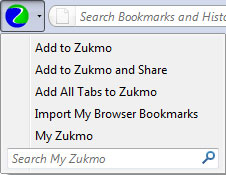
The menu items of the new plug-in has been overhauled to include some new actions and modify some prior ones. For existing users, any difference from prior versions is explained in parenthesis as notes.
-
Add to Zukmo – This will bookmark by adding the URL link and the page content snapshot to your library. Same result as single clicking on the zukmo button directly – (Note: Same as in previous version)
-
Add to Zukmo and Share – This will provide options to both bookmark content and share it with friends through email or post to your facebook/twitter account. – (Note: This is a modification to the previous version and has merged the options that existed earlier and will present the choices to share a bookmark with friends or send to facebook or twitter from a single pop up window)
-
Add all Tabs to Zukmo – This will bookmark across all the open tabs in your current window by adding the URL link and page content snapshot in each tab to your library – (Note: New option)
-
Import my Bookmarks – This will import all the saved bookmarks in your current Browser into Zukmo – (Note: Same as in previous version)
-
My Zukmo – This will take you to your Zukmo account – your Personal Digital Library (Note: New Option)
-
Search Bar – This will search within your Zukmo account – (Note: Same as in previous version)
-
-
Login integration for Yahoo and Google account holders:
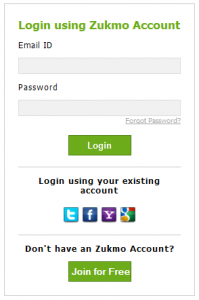
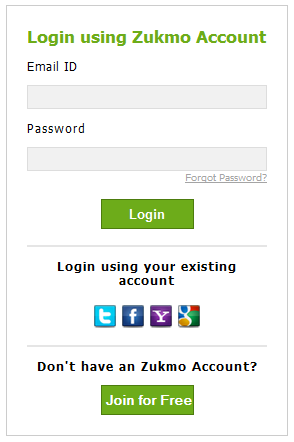
You can simply use your existing email (Yahoo/Google) or social media (FaceBook/Twitter) and need not create any specific account with Zukmo. We do not store any of your existing account passwords and these require one time authorization and all authentications are done by the respective sites only.
Note: For existing users who had created their Zukmo accounts earlier using a Yahoo or Gmail email address as the Username and a zukmo specific password, they can simply go ahead click on the Yahoo icon in the login page and proceed to login with their yahoo accounts. We have ensured that you can retrieve all your bookmarks now through your existing Yahoo account. Your earlier Zukmo account will be internally tied to your existing Yahoo account and all your saved bookmarks will appear if you directly use your Yahoo or Google account.
-
Auto suggestion of keywords during search:
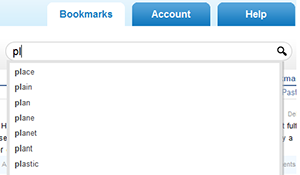
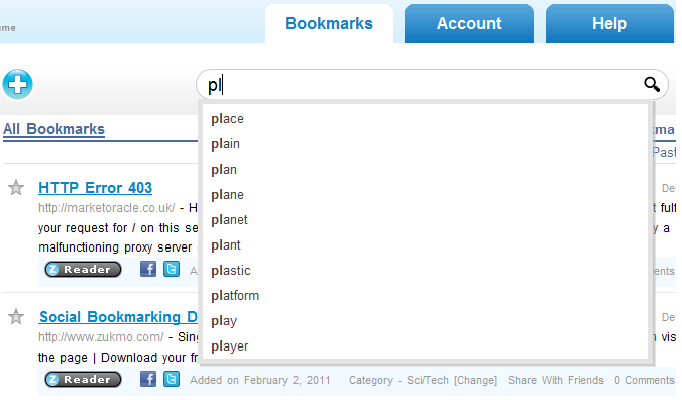
The search functionality now has a built-in Auto-Complete feature which, as you start to enter search terms offers a list of suggested searches. You can then easily pick one of the suggestions or continue refining the suggestions by typing in more of the query.
-
Synchronize Bookmarks from Delicious:
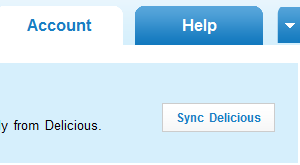
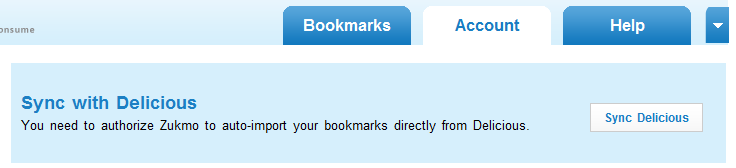
After logging into “My Zukmo” (Users personal account at Zukmo), go to Account > Sync with Delicious and use the “Sync Delicious” button to import the bookmarks from delicious directly into Zukmo. Please follow the instructions listed in that page. This is much faster than exporting out of delicious and then importing into Zukmo
-
Addition of comments to search results for bookmarks:
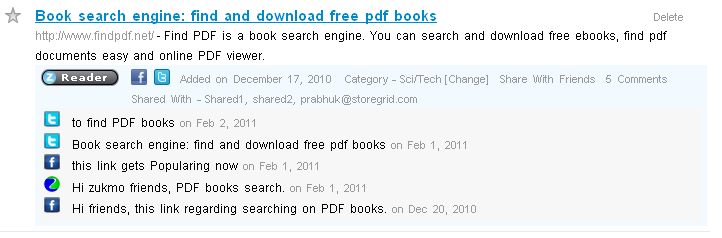
You can skim through the comments registered while you shared the bookmarks through the various means available – Friends, Facebook & Twitter
-
Miscellaneous:
In addition to all the above, we have optimized and fine tuned our search performance and have given priority to indexing the live bookmarking by users over indexing a batch of imported bookmarks. So, users who are browsing sites will see their contents indexed fairly rapidly upon using the Zukmo browser button and can search through the content in short notice. Finally, existing users will notice changes to the layout and content in our Account, FAQ and Features section.
All in all, we are deeply committed to delivering on our vision and our dedicated band of developers are working hard to infuse rich capabilities into this product. The entire Zukmo team is basing the objective of this alpha as one to be continually improved through user feedback and suggestions and so we warmly welcome your inputs on our budding service.

