
TL;DR: VHD, VHDX, AVHD, and AVHDX are Hyper-V virtual disk formats used for storage and snapshot operations. VHDX offers better performance and resiliency compared to VHD, while AVHD/AVHDX are differencing disks used in checkpoints. Understanding these formats helps optimize storage, performance, and backup strategies.
For beginners working with Hyper-V for the first time, storage is one of the essential aspects of the solution to wrap your head around. Hyper-V provides many robust storage features allowing businesses to meet the storage challenges of their critical workloads. These storage features include various Hyper-V disk types that offer different features, functionality, and capabilities. Let’s look at Hyper-V disk types for beginners and compare their features.
Different Hyper-V disk types
There are a few different Hyper-V disk types that Hyper-V administrators must understand and the features, capabilities, and limitations of each. Let’s look at the following:
- VHD
- VHDX
- AVHD and AVHDX
VHD disks
The oldest and traditional Hyper-V disk type is the VHD disk. It is the type supported in every version of Hyper-V released and provides the most basic features when compared with the newer disk format, including VHDX
VHD virtual disk format is not a proprietary Microsoft format. Instead, VHD is supported by Windows, Citrix, Oracle, and others. However, it has many limitations, especially for organizations needing the latest features and capabilities with modern virtual disk formats.
What are the features and limitations of the VHD virtual disk format?
- It is limited to 2TB of storage capacity
- VHD does not protect your data against corruption as well as the VHDX format
- It offers no live resizing capabilities
- Data alignment is not optimal with VHD
- VHD does not support the trim function
- It does not offer support for custom metadata
- For those migrating VMs to the cloud, VHD is the only virtual disk format supported by Microsoft Azure
VHDX disks
In case you were unaware, there is a new Hyper-V disk format known as the VHDX virtual disk. The VHDX disk is a new virtual disk released with Windows 2012. It offers many new enhancements compared to the VHD disk and is generally the preferred Hyper-V disk type in most greenfield virtual machines created on new Windows Server Hyper-V versions.
Note the following capabilities and features:
- It supports virtual hard disks up to 64 TB in size
- It provides data corruption protection for power failures as it logs updates to VHDX metadata
- VHDX provides greatly improved alignment for virtual hard disk format on large sector disks
- It offers larger block sizes
- It also offers a 4-KB logical sector which increases the performance of workloads designed for 4-KB sectors
- It creates custom metadata about files users want to record, such as patches, OS versions, etc
- It also supports trimming, resulting in smaller, more efficient file sizes and space reclamation processes
AVHD and AVHDX disks
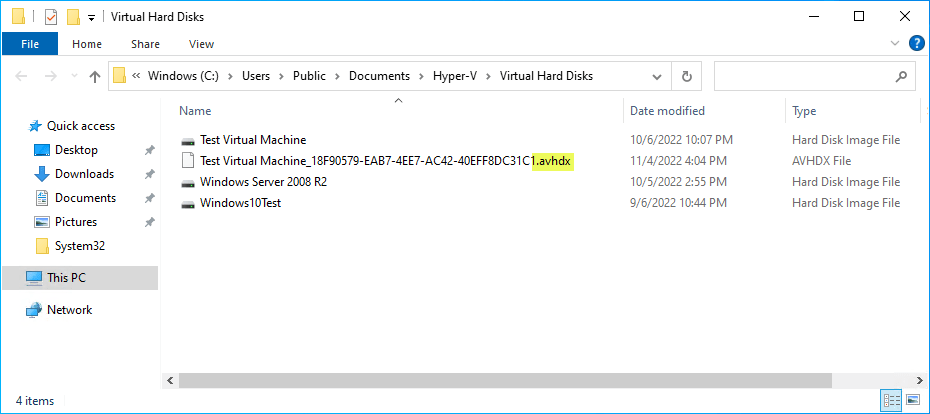
Another special-purpose disk that is used in a Hyper-V environment is the differencing disk associated with Hyper-V checkpoints. For the VHD and VHDX base disks, Hyper-V creates a differencing disk for these parent disk types. A differencing disk is the special-purpose disk used for capturing all new disk writes coming into the Hyper-V virtual machine.
Checkpoints allow for creating a point-in-time “image” of a virtual machine, allowing Hyper-V admins to roll back changes to the state captured in the checkpoint. When you create a checkpoint on a Hyper-V virtual machine, you will see the special differencing disk created when you look at the low-level Hyper-V virtual machine folder.
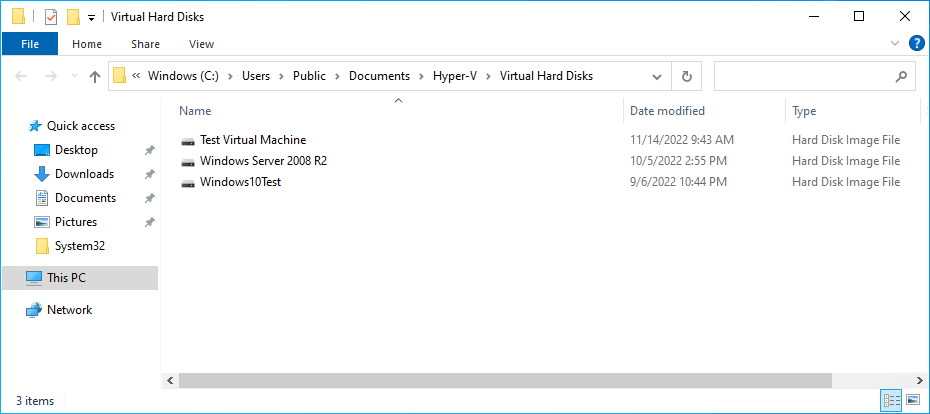
Below is a AVHDX disk created on a Hyper-V virtual machine configured with VHDX.
Converting between VHD and VHDX
You may wonder if you are locked into a particular Hyper-V disk type once these are initially chosen when creating a virtual machine. Microsoft has a built-in means to convert between VHD and VHDX files in Hyper-V Manager and PowerShell.
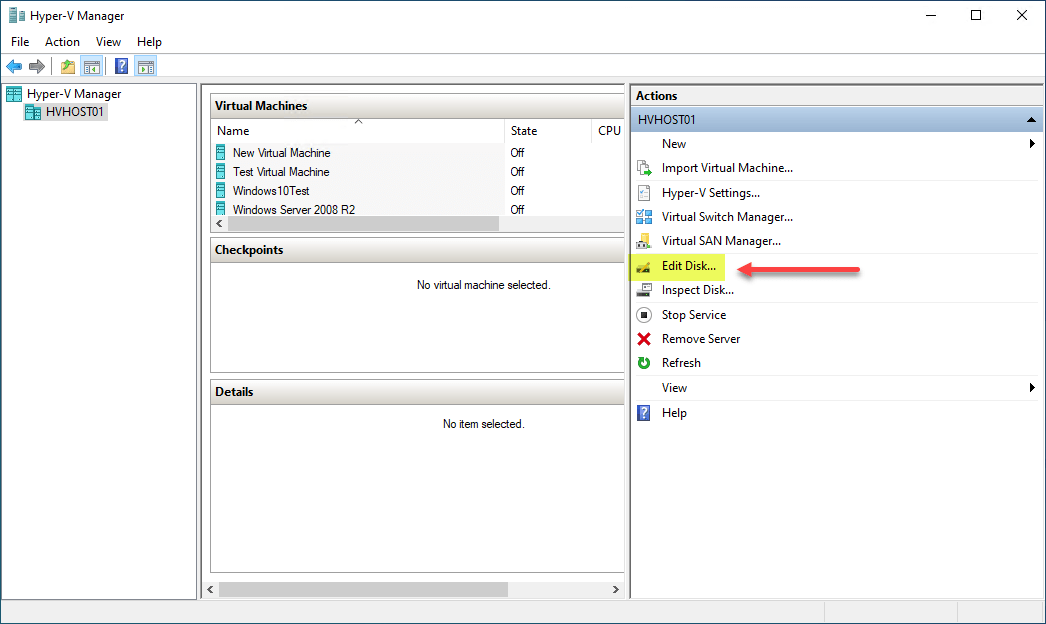
It allows converting from VHD to VHDX and the reverse, VHDX to VHD. In Hyper-V Manager, click the Edit Disk option in the Actions pane.
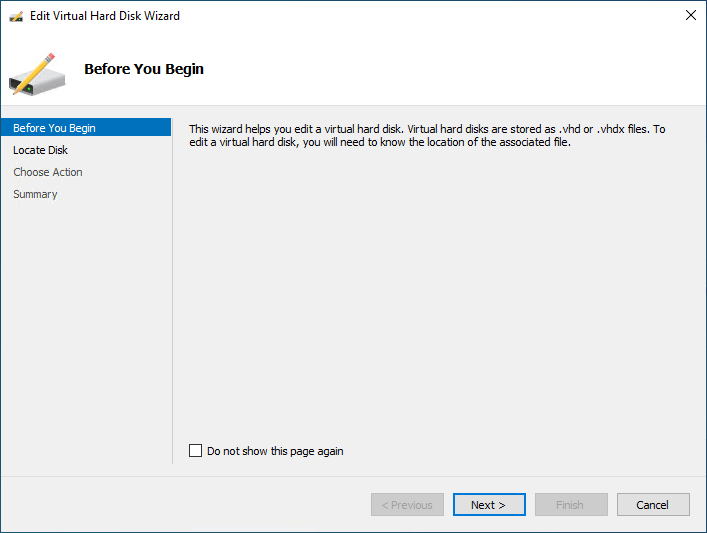
It launches the Edit Virtual Hard Disk Wizard. Click Next.
Choose the specific Hyper-V virtual disk you want to convert.
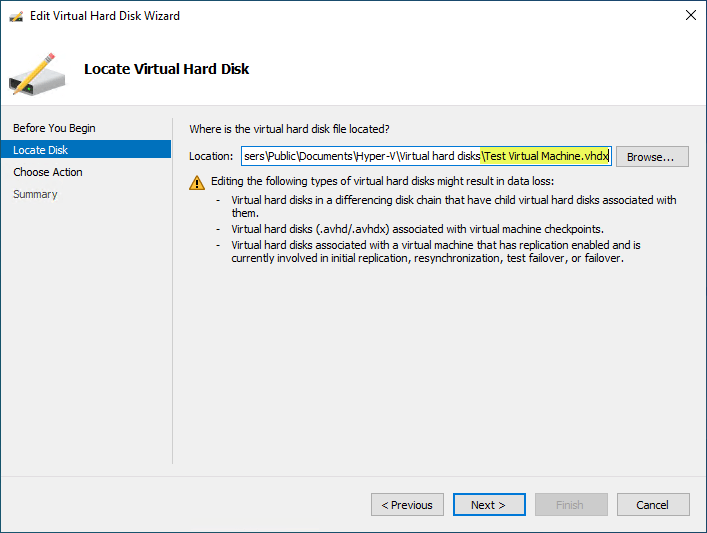
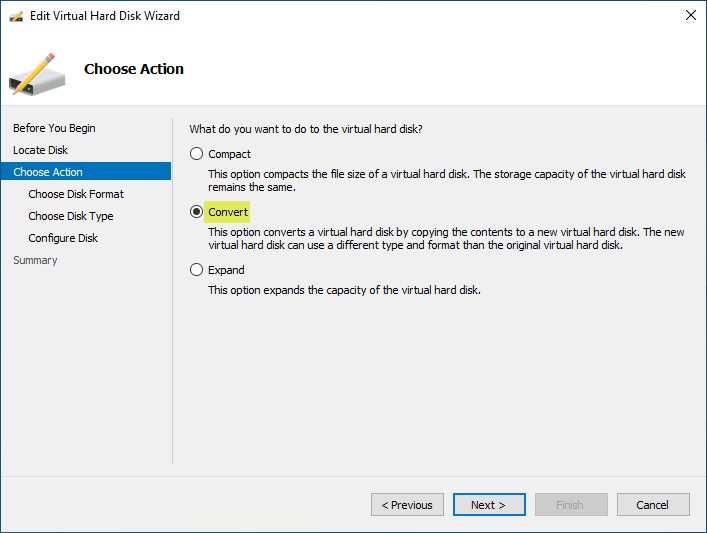
On the Choose Action screen, choose Convert. As noted by the description of the operation, this option converts a virtual hard disk by copying the contents to a new virtual hard disk. The new virtual hard disk can use a different type and format than the original virtual hard disk.
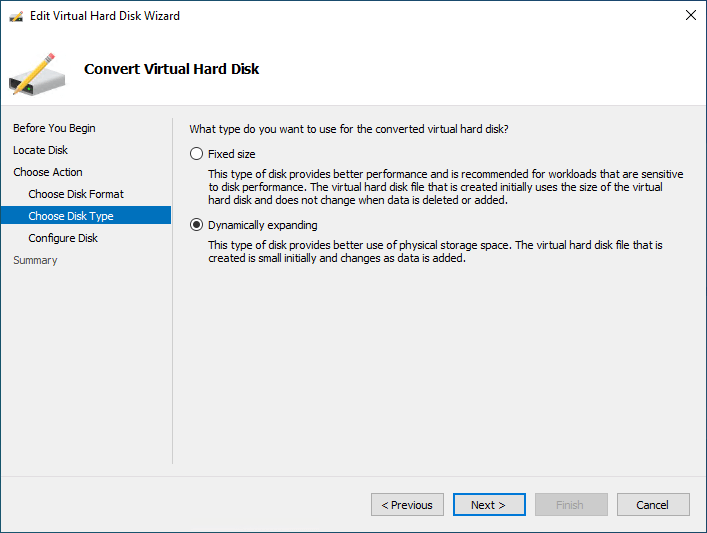
On the disk type, you can leave the type as the previous format or change between Fixed size or Dynamically expanding. So, in addition to the conversion between VHD and VHDX, you can also convert between fixed and dynamically expanding disks.
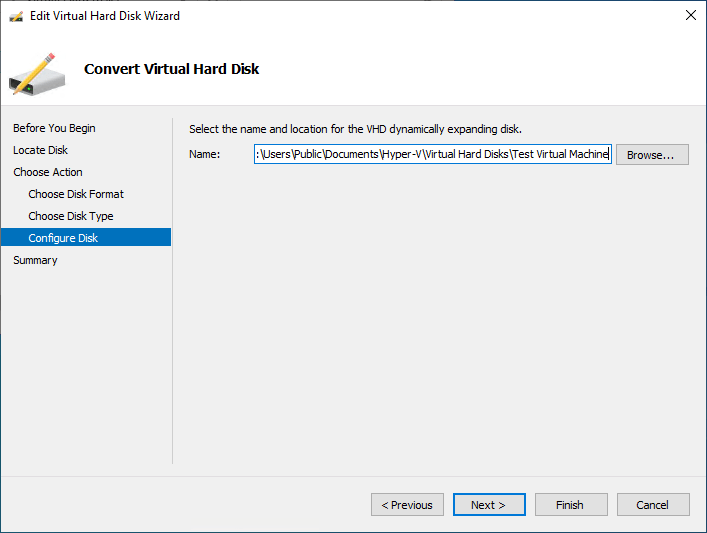
The Configure Disk screen isn’t extremely intuitive. However, on this screen, you need to enter the name of the virtual hard disk as you want it to be named as part of the conversion. As a note, the original disk will be left and not deleted.
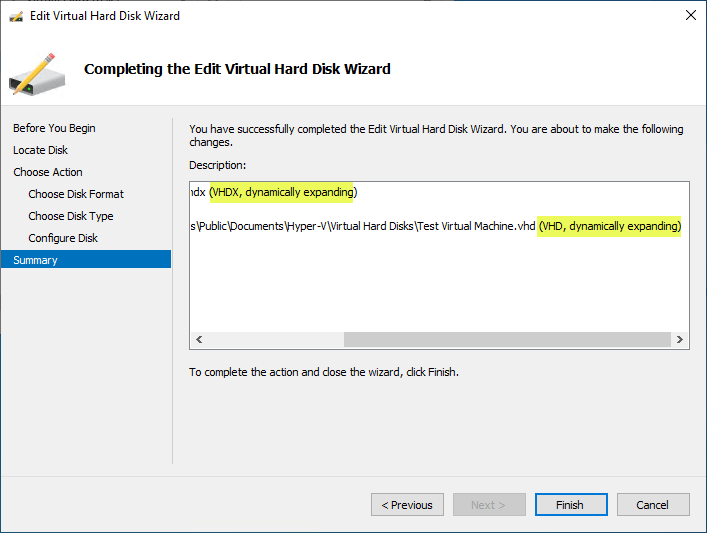
On the Summary screen, you will complete the conversion process by confirming the actions to be taken. Here we see we are converting from a VHDX file to a VHD file. We are leaving the type at Dynamically Expanding. Click Finish to begin the conversion.
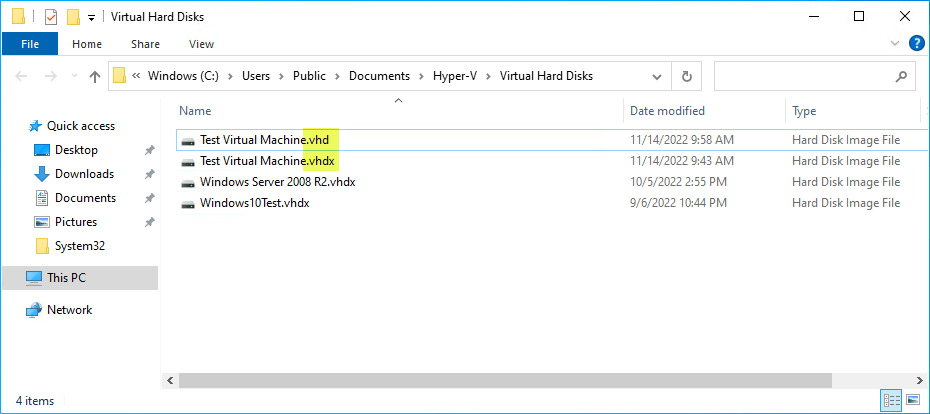
After the conversion process completes successfully, you will see both types of disks in your Hyper-V virtual machine folder. As expected, we see both the VHD and VHDX files.
Hyper-V disk types FAQs
What is a Hyper-V VHD file?
A Hyper-V VHD is the legacy Hyper-V virtual disk format supported since the first version of Hyper-V. It offers the least features and is limited in capabilities and functionality compared to Hyper-V VHDX. Interestingly, Microsoft only supports VHD disks with Microsoft Azure.
What is a Hyper-V VHDX file?
Hyper-V VHDX files are the newest virtual disk format. It offers much larger configuration maximums compared to VHD. It also offers additional capabilities such as corruption protection, metadata fields, trim functionality, better disk alignment, and larger block sizes.
What are Hyper-V AVHD and AVHDX files?
These are differencing disks associated with Hyper-V checkpoints. They capture all the new writes for a Hyper-V virtual machine. Hyper-V uses them to revert to a specific point in time when needed.
Can you convert between VHD and VHDX Hyper-V disks?
The Edit Disk feature in Hyper-V Manager allows easy conversion between VHD and VHDX files and between fixed and dynamic disks.
FAQs
1. What is the difference between VHD and VHDX?
VHD is an older virtual disk format with a 2 TB size limit and less resiliency. VHDX supports up to 64 TB, offers better performance, and includes protection against data corruption. VHDX is recommended for modern Hyper-V deployments.
2. What are AVHD and AVHDX files in Hyper-V?
AVHD and AVHDX are differencing disk files created when a checkpoint (snapshot) is taken. They store changes made after the checkpoint, allowing the system to revert to previous states if needed.
3. Can you convert VHD to VHDX?
Yes, you can convert VHD to VHDX using Hyper-V Manager or PowerShell. Conversion improves performance, scalability, and reliability for virtual machines.
4. When should you use VHDX instead of VHD?
You should use VHDX for most modern workloads because it supports larger disk sizes, better performance, and improved resilience. VHD is mainly used for compatibility with older systems.
5. Are AVHD/AVHDX files safe to delete?
No, AVHD/AVHDX files should not be manually deleted unless checkpoints are properly merged. Deleting them incorrectly can cause data loss or VM corruption.
Wrapping Up
Understanding the different types of Hyper-V disks helps to understand the capabilities and features that align with various use cases and how Hyper-V handles virtual disk storage. Between VHD, VHDX, AVHD, and AVHDX, Hyper-V disks offer robust functionality for virtual machines supporting business-critical applications.
Read More:
Beginners’ Guide for Microsoft Hyper-V: How to Import OVA into Hyper-V – Part 44
Hyper-V VHDX Optimizations and Resizing
Follow our Twitter and Facebook feeds for new releases, updates, insightful posts and more.

