
Today, a new build of Zukmo went into production. Several improvements were made to Zukmo in this build. We talked about one of them in our previous post.
Below are a couple of more improvements to Zukmo that are now live:
1. Search Zukmo:
One could say that Search is the defining feature of Zukmo. Once you bookmark a page, Zukmo allows you to search inside the content of the page. No need to tag the page or create folders just to navigate back to the page. All you have to do is search for any word or phrase you remember from that page and Zukmo will bring it back for you.
Until now, to search for a page in Zukmo, you had to go to Zukmo.com and then search for it. We wanted to make it even easier. Our first thought was to provide a way to make Zukmo one of the search providers on browsers. However, this means that every time you want to search Zukmo, you will have to change the search provider on your browser to Zukmo. This wasn’t really helping the user. It is easier to just go to Zukmo.com each time and search for it. A little more thought and a little more hacking resulted in a much better user experience. We’ve added a search box as a menu option within the Zukmo browser button (as shown below)
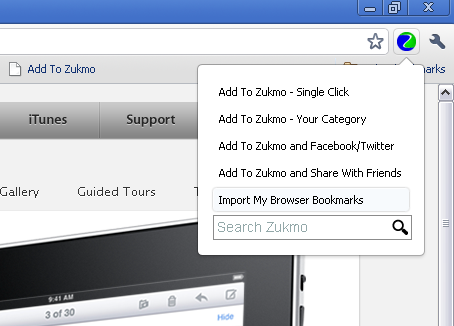
Now, to search anything you have bookmarked just go to your Zukmo browser button and enter the word or phrase from the bookmarked page and Zukmo will open up with the search results.
2. Faster Bookmarking:
We’ve made bookmarking even faster. We used to upload the entire page from your browser to Zukmo. Now, we just upload the url and our crawling engine takes care of the rest. In terms of user experience, this results in a much faster bookmarking process. You click on the browser button or bookmarklet and within a second the page is bookmarked.

