
We just pushed out a new build of Zukmo into production that has an important change that will make it much easier to import bookmarks from Mozilla Firefox and Google Chrome browsers.
The Zukmo browser button has a new menu option: “Import My Browser Bookmarks”. Just click on it and voila, all the bookmarks from the browser will automatically get into your Zukmo account. You can click on “Import My Browser Bookmarks” at any time. If you imported all your browser bookmarks today and click on “Import My Browser Bookmarks” again after six months, all the new bookmarks you added since today will get imported.
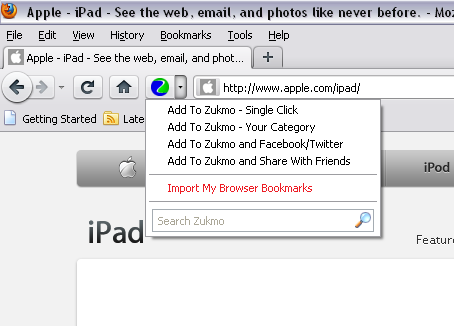
Browser
If you haven’t installed the Zukmo browser button yet, now is the time to do it. If you’ve already installed it, you will see an update extension request if you are using Firefox; if you are a Google Chrome user, you will notice that the browser button will get updated on its own (usually within a couple of hours of us updating the browser button).

